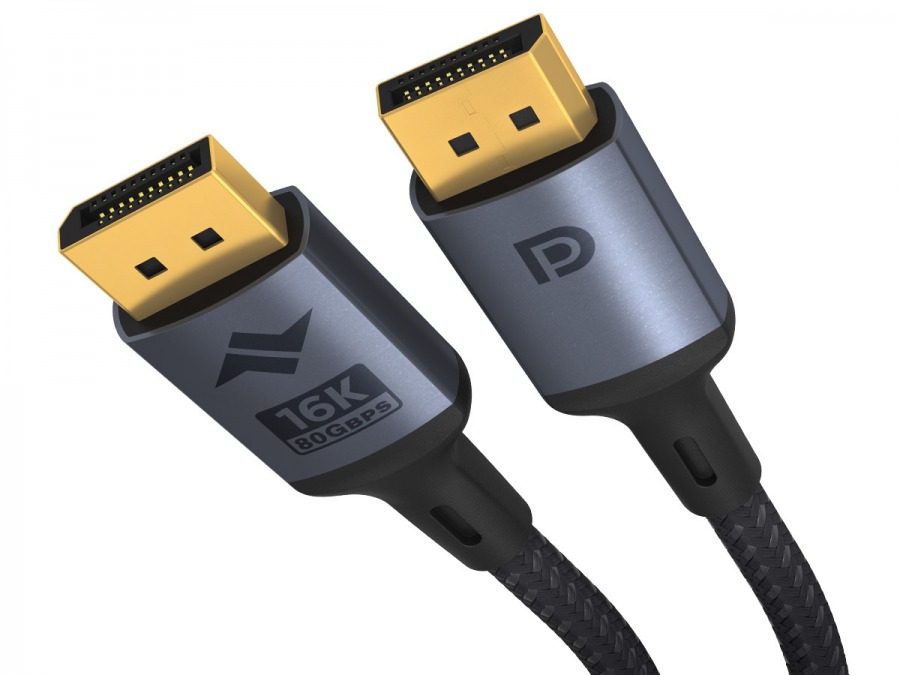
At last - 80Gbps DisplayPort cables are here!
Provides an 80Gbps DisplayPort link between compatible computers and displays, for resolutions up to 8K@120Hz, with compatibility for advanced DisplayPort features like MST, HDR, VRR, DSC, Audio and more. The one DisplayPort cable you need to ensure compatibility with all hardware for the foreseable future!
DisplayPort is still the connection of choice for PC, especially for gaming-grade monitors that leverage high resolution, high frame rate panels to deliver incredible visual fidelity. This DP80 cable (also known as a UHBR20 cable) boasts 80Gbps of bandwidth for truly mind-bending display compatibility from the humble 1080p screen at a colossal 720Hz, to a huge 8K display at a silky-smooth 120Hz. Both extremes are possible, as well as everything in between!
You're not stuck with the basic everyday resolutions, either; you can run your 5K Ultra-Wide at max spec, your trusty 1440p WQHD at it's limit, and of course your top of the line OLED 4K panel will be in good hands. With 80Gbps bandwidth, you can also enjoy High Dynamic Range, Variable Refresh Rate and even Multi-Stream Transport features without compromising on your display mode of choice.
The Avencore Carbon Series DisplayPort range provides this bandwidth with a stylish alloy plug and a hard-wearing cotton braid for a long service life pushing pixels between your computer and your monitor. Whether you're word processing, editing film or gaming like there's no tomorrow, this state-of-the-art DP cable will have you covered.
Product Specifications:
- 5 Year Avencore Warranty
- 3m Male to Male DisplayPort
- 80Gbps UHBR20 cable (DP80)
- Compatible with all DisplayPort 2.1 features
- Backwards-compatible with DisplayPort 1.2, 1.4, 2.0 hardware
- Lock-free plugs for ease of use and better durability
- Metal alloy plugs for long service life
- Compatible up to 16K @ 30hz, 8K @ 120Hz, 4K @ 240Hz
- More display modes possible via DSC (Display Stream Compression)
- G-Sync, FreeSync and VRR compatible
- High Dynamic Range (HDR compatible)
- Perfect companion for high-end gaming monitors and ultra-wide displays
- Colour: Gunmetal Grey Shell & Black Cable
Why shop with Cable Chick
- Australia's leading retailer of AV cables and tech accessories
- Flat-rate shipping nation wide
- Secure online shopping 24/7
- 14 years experience with 1000's of health, government & education clients
- ALL products locally stocked for same-day dispatch
- Industry leading warranties up to 5-years on products
- A customer base of over 250k+ Australians who trust Cable Chick
- Proudly to be 100% Australian, employing all local staff
(31st July, 2014)
Product Review by Graeme,

The DP3001 Display Port to VGA Cable purchased works like a charm. The cable itself is not one of those flimsy, cheap replace every couple of months types either, this one is quite solid and it's easy to see that some thought has gone into its manufacture.
Highly recommend this one, and, if there is a Display Port to DVI cable from the same manufacturer, I'd be recommending that one as well.
As always, shipping time and service from Cable Chick continues to rate very high.


Written on 26th June, 2024 by Cable Chick
These days, a single monitor setup almost feels like a punishment. The experience of constantly expanding and minimising windows to perform a simple task knowing how easy it would be with a second monitor is frankly archaic. So this must be what Marty McFly felt like in 1955. Now unless you're a masochist, it might be time to introduce your display to a friend or two and experience how much better things can be. [
Read More]
Blog Category:
How To Guides Tags: HDMI, DisplayPort, How To Guides, Multi-Displays, Signal Converters, Adapters, Essential Reading, Tech Guides, Buying Guide, Mounts & Brackets, Display Devices, USB Type-C

Written on 25th Nov, 2020 by Cable Chick
Make the most of 4K content with our handy connectivity guide! It covers cables, switchers, splitters and all the major 4K content sources available today. [
Read More]

Written on 6th April, 2020 by Cable Chick
Discover the easiest way to connect your laptop to one or more additional screens with our handy visual guide. [
Read More]
Blog Category:
How To Guides Tags: VGA, How To Guides, AV Signal Converters, Multi-Displays, Adapters, Video Conversion, Tech Guides, Buying Guide, Display Devices, USB Devices, USB Type-C, Thunderbolt


 100+ In-Stock & Ships Today!